- March 6, 2026
- Anthony Scott
- 0 Comment
How Claude Code Can Be Transformed Into a Powerful SEO Command Center
Search engine optimization has always demanded the juggling of multiple platforms. On any given workday, an SEO professional might be found switching between Google Search Console, Google Analytics 4, Google Ads, and various AI tools, all while attempting to draw meaningful connections between the data each platform provides. This constant tab-switching is not just inefficient; it is also a significant source of missed insights (Read more).
A more integrated approach has recently been made possible through the combination of Claude Code and a simple directory of Python-powered API fetchers. When this setup is properly configured, questions such as “which keywords are currently being paid for that are already ranking organically?” can be answered in seconds rather than hours. This guide walks through exactly how that system is built, how it is used, and what limitations should be kept in mind before diving in.
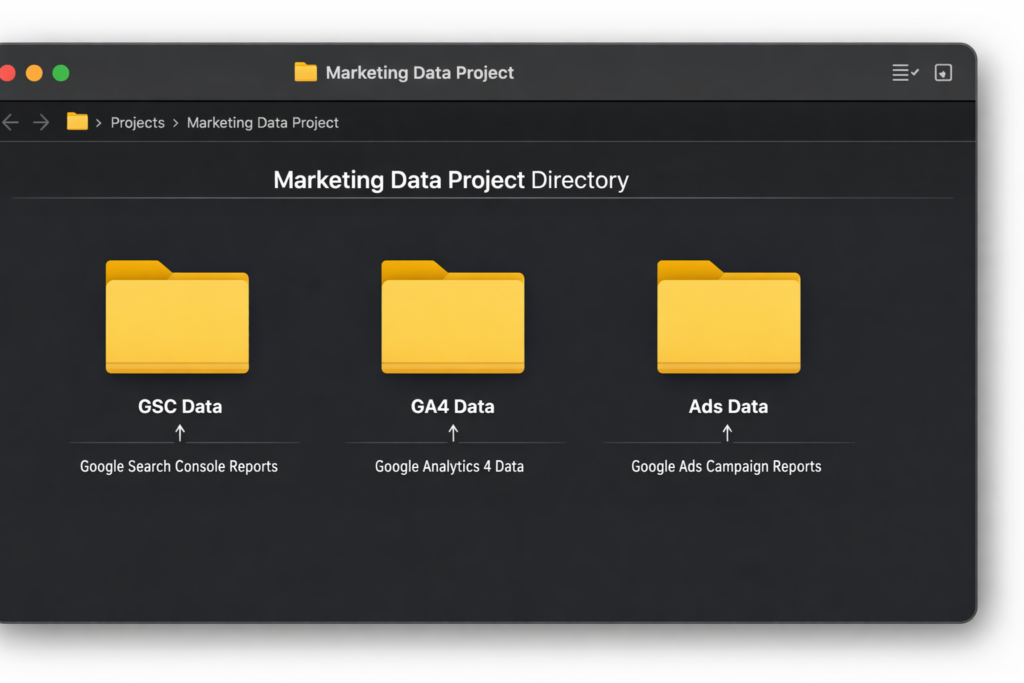
What the System Is Designed to Do
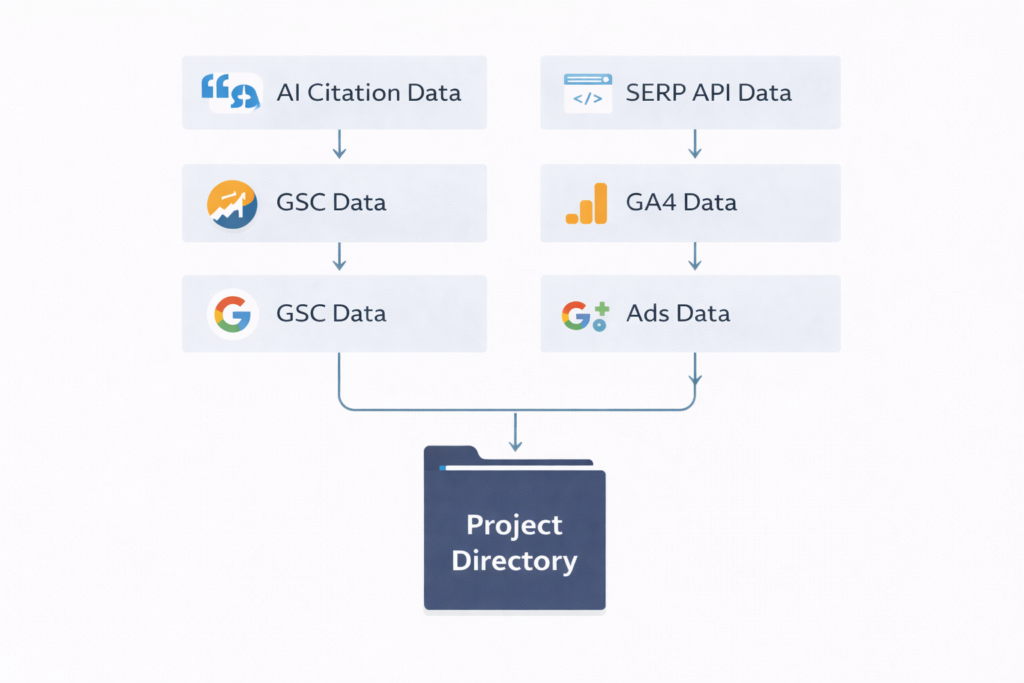
At its core, what is being built is a local project directory in which Claude Code is given access to live data pulled from Google’s APIs. Data is fetched via Python scripts, saved as JSON files, and then analyzed through a conversational interface — no dashboards required, no Looker Studio templates to maintain.
The project directory is organized as follows:
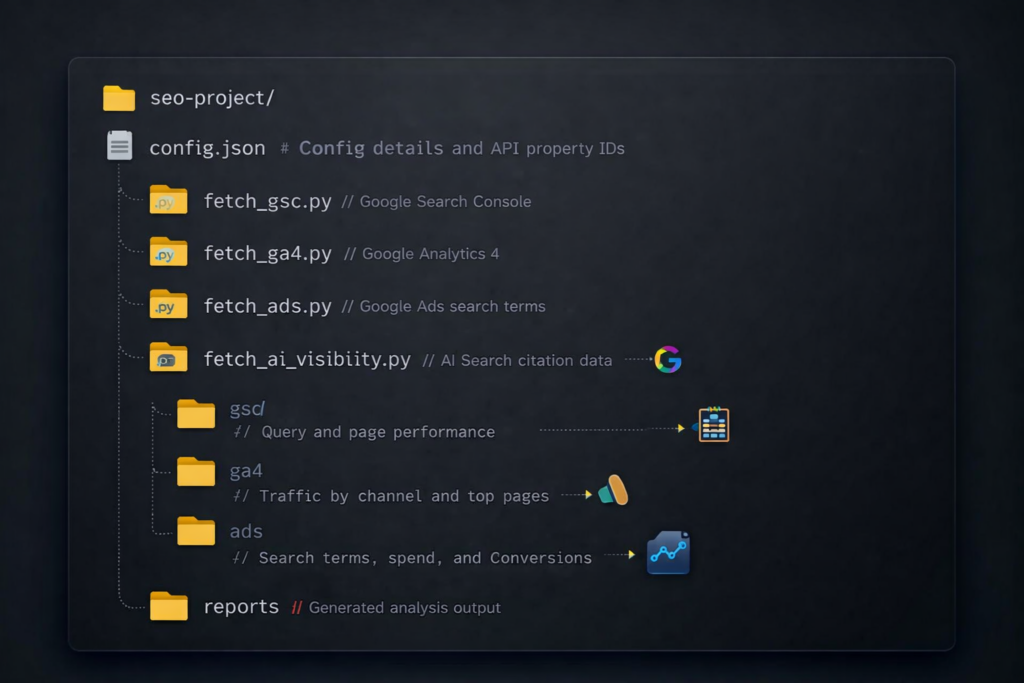
Rather than building a reporting interface, this approach gives Claude Code the same data a human analyst would examine, and allows it to cross-reference all of it simultaneously.
Step 1: Setting Up Google API Authentication
Everything in this system is powered by a Google Cloud service account. One service account is sufficient to authenticate with both Google Search Console and Google Analytics 4, which simplifies the setup considerably. Google Ads, however, requires its own OAuth authentication — more involved, but still manageable.
Service Account Setup for GSC and GA4
The following steps are required to configure a service account:
- A new project is created in Google Cloud Console.
- The Search Console API and the Google Analytics Data API are both enabled.
- A service account is created under IAM & Admin > Service Accounts.
- A JSON key file is downloaded from the service account settings.
- The service account’s email address is added as a user in the relevant GSC property (read-only access is sufficient).
- That same email is added as a Viewer in the corresponding GA4 property.
For agencies managing multiple clients, a single service account can be used across all accounts. It simply needs to be added to each client’s GSC and GA4 properties, and the corresponding property IDs are entered into a per-client configuration file.
Google Ads Authentication
Google Ads authentication is handled differently and requires three components:
- A developer token obtained from the Google Ads API Center.
- OAuth 2.0 credentials generated from Google Cloud (separate from the service account).
- A one-time browser authentication step to generate a refresh token.
Developer token approval typically takes 24 to 48 hours. For agencies using a Manager Account (MCC), a single developer token and refresh token can be used across all sub-accounts — only the customer ID needs to change per client.
For situations where API access is not yet available, downloading 90 days of keyword and search terms data as CSVs from the Google Ads interface works just as well. Claude Code is able to read and analyze those files in the same way it handles JSON.
Installing Dependencies
All scripts assume a Mac or Linux terminal environment. For Windows users, Windows Subsystem for Linux (WSL) is recommended. The following installation command is used:
Step 2: Building the Data Fetchers
Each fetcher is a short Python script. Its job is straightforward: authenticate with the relevant API, pull the requested data, and save it as a JSON file. Notably, none of these scripts need to be written from scratch. When described in plain language — for example, “pull the top 1,000 queries from Search Console for the last 90 days” — Claude Code is able to generate the appropriate script, including authentication logic and query parameters, without requiring any direct reading of API documentation.
Google Search Console Fetcher
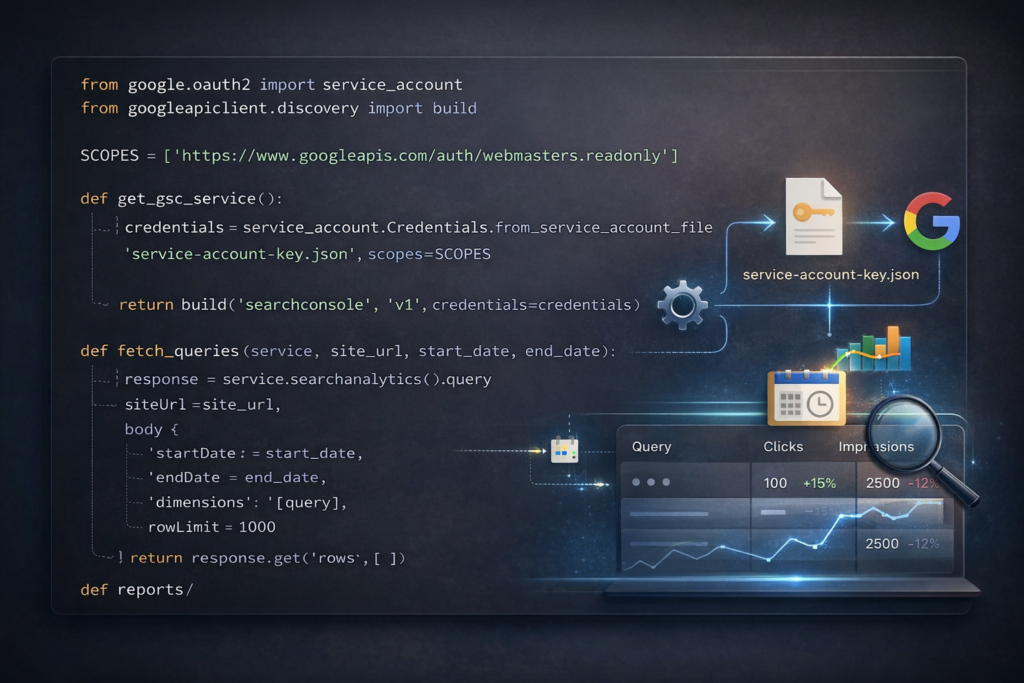
This script returns queries along with clicks, impressions, click-through rate, and average position. The data is saved as JSON for later analysis.
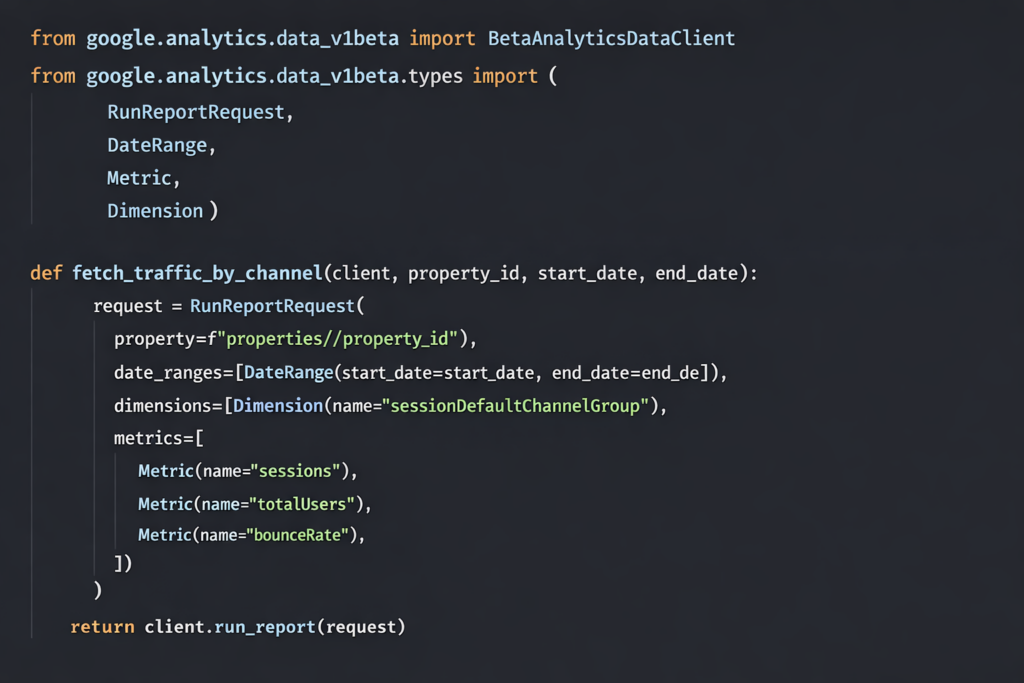
GA4 Fetcher
Google Ads Fetcher
Google Ads uses a SQL-like query language called Google Ads Query Language (GAQL). As with the other fetchers, Claude Code is capable of writing this query when given a plain-language description of what data is needed:
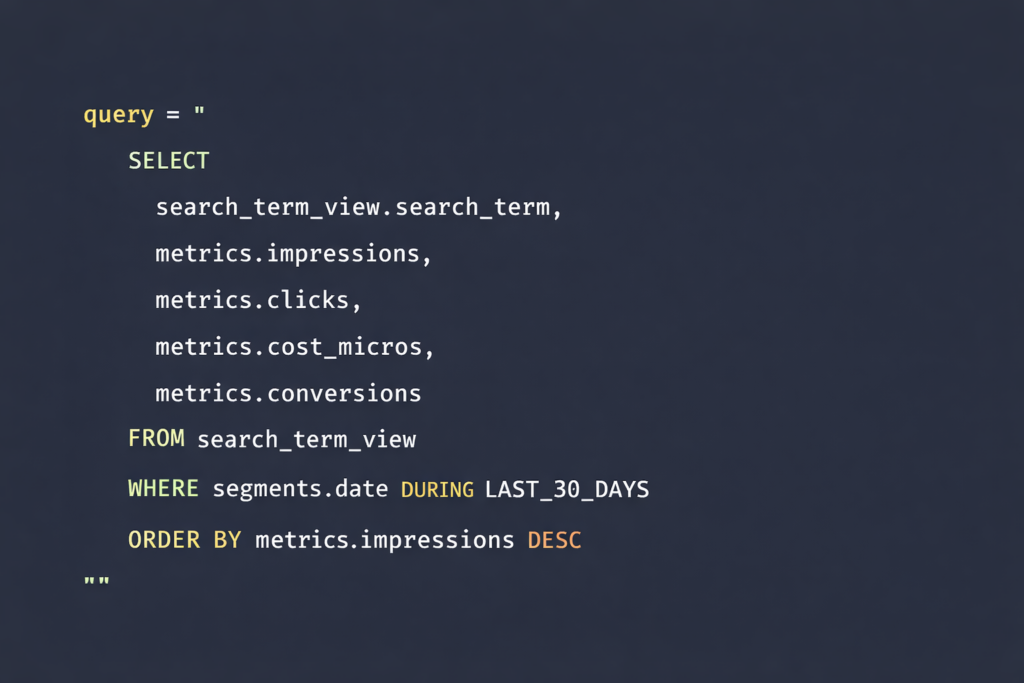
This returns data equivalent to what is found in the Search Terms report inside the Google Ads interface: impressions, clicks, cost, conversions, match type, campaign, and ad group.
Step 3: Configuring a Client Config File
A single JSON file is maintained per client. It contains the key property IDs and some contextual information:
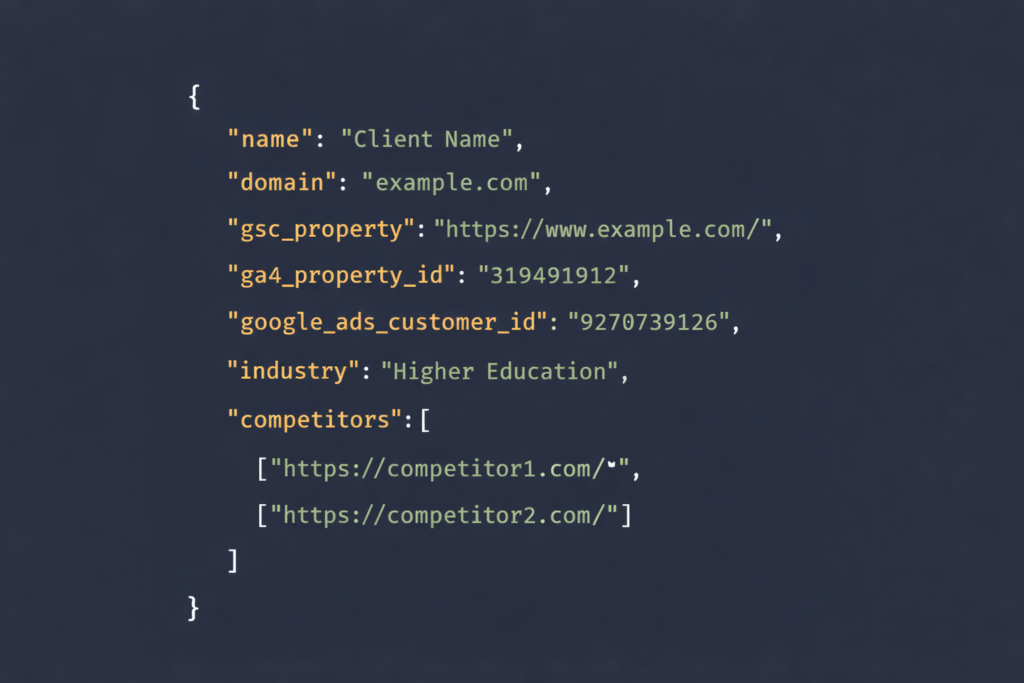
Step 4: Asking Cross-Source Questions
Once JSON files from GSC, GA4, and Google Ads have been saved to the project directory, Claude Code is able to read all of them simultaneously. Cross-source analysis that would ordinarily require VLOOKUP-heavy spreadsheet work can be performed through simple conversational prompts.
The Paid-Organic Gap Analysis
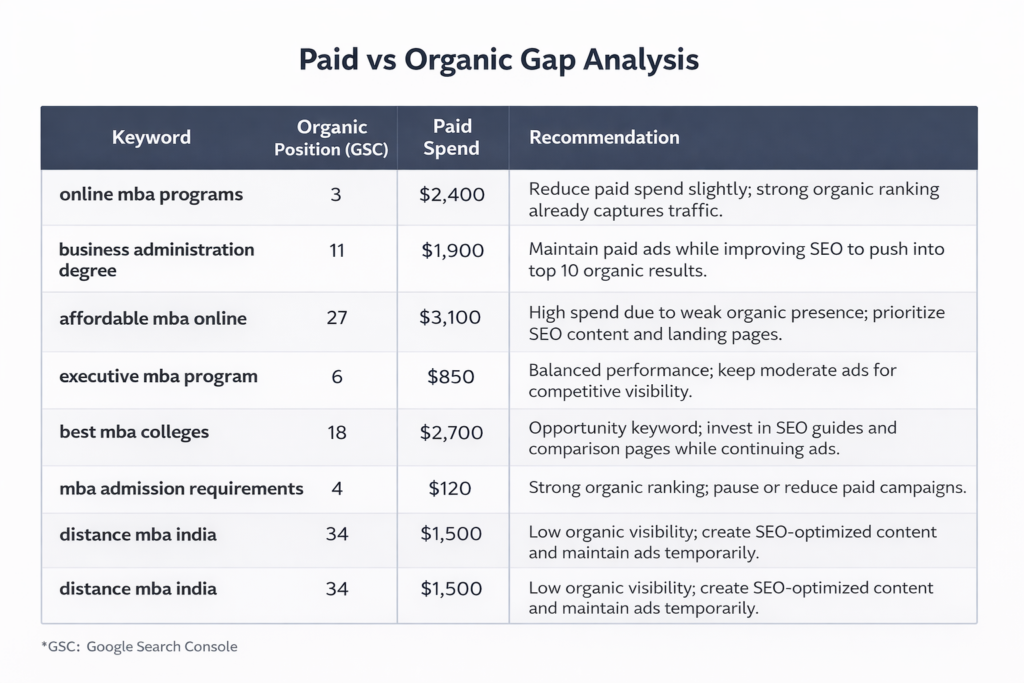
Perhaps the most valuable analysis that can be run with this setup involves comparing paid and organic keyword data to identify overlap and gaps. A prompt such as the following can be used:
“Compare the GSC query data against the Google Ads search terms. Find keywords where we’re paying for clicks but already have strong organic positions. Also, find keywords where we’re spending on ads with zero organic visibility — those are content gaps.”
When this analysis was run for a higher education client, the results identified the following:
- Over 2,700 search terms with wasted ad spend (impressions but zero clicks).
- More than 350 opportunities to reduce paid spend where organic rankings were already strong.
- 33 high-performing organic queries where paid amplification could add value.
- 41 content gaps where no organic presence existed at all.
The entire analysis was completed in approximately 90 seconds. An equivalent manual process — downloading CSVs from GSC and Google Ads, cross-referencing them with VLOOKUP formulas, and categorizing the overlaps — would typically take most of a working afternoon.
Additional Questions Worth Exploring
Beyond the paid-organic gap analysis, a range of additional cross-source questions can be asked once all three data sources are loaded:
- Meta description and title opportunities: “Which pages get the most impressions in GSC but have a low click-through rate? What is the GA4 traffic for those same pages?”
- Paid amplification candidates: “What are the top 20 organic queries by impression that are not currently supported by paid campaigns?”
- Content investment priorities: “Group GSC queries by topic cluster and show which clusters have the most impressions but the lowest average ranking position.”
- User experience issues: “Which pages in GA4 have high bounce rates but strong GSC ranking positions?”
Step 5: Adding AI Visibility Tracking
Traditional SERP positions no longer tell the full story of search visibility. With the rise of Google AI Overviews, Bing Copilot, ChatGPT search, and Perplexity, understanding whether a brand’s content is being cited by AI systems has become increasingly important — particularly in sectors where users tend to begin their research in AI-powered tools.
Using a Dedicated Tracking Platform
Platforms such as Semrush’s AI Visibility toolkit, Scrunch, and Otterly.ai are capable of tracking brand presence across multiple AI search environments. Data exported from these tools as CSV or JSON files can be dropped into the project directory, allowing Claude Code to cross-reference AI citation data against GSC rankings and Google Ads spend.
One practical example of what this kind of analysis can reveal: two blog posts on the same site were found to be competing for AI citations on the same topic. One received twelve times more Copilot citations than the other, despite targeting similar user intent. That discovery led to a content consolidation decision that would not have been apparent from traditional ranking data alone.
Using APIs Without a Dedicated Platform
Several API-based options exist for teams that do not have access to an enterprise-level tracking tool:
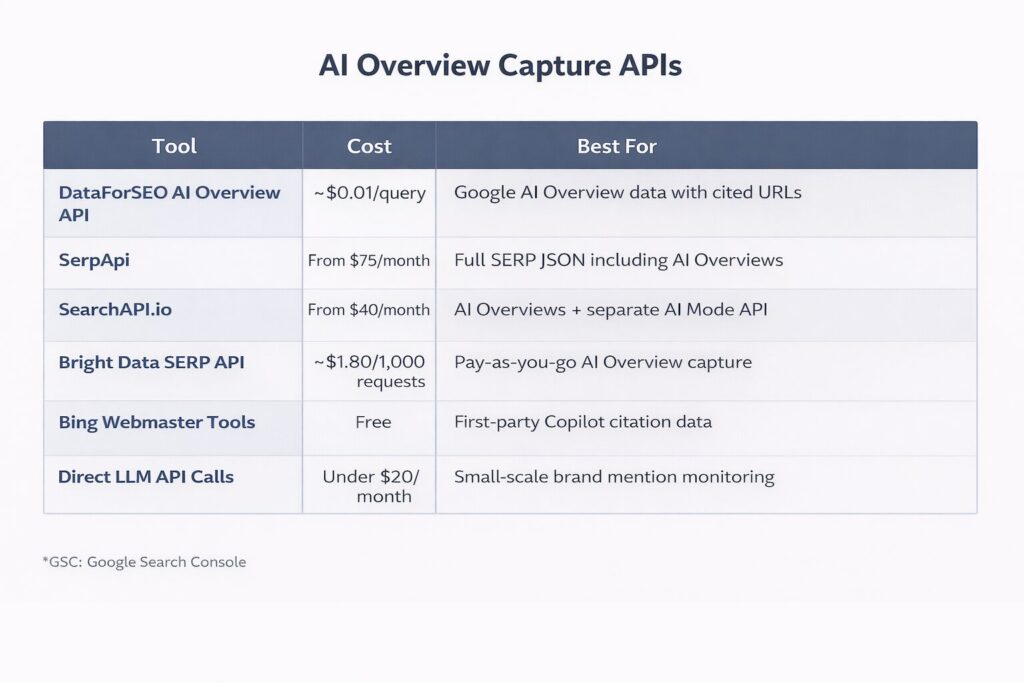
Bing Webmaster Tools is worth special mention because it is the only source of first-party AI citation data currently available from any major platform. It provides page-level data showing how often content appears as a source in Copilot responses, along with the queries that triggered those citations.
For teams with limited budgets, direct API calls to OpenAI, Anthropic, and Perplexity using a consistent set of prompts is a low-cost approach to monitoring brand mentions across AI responses.
The Practical Workflow: What a Typical Month Looks Like
In practice, the workflow operates in three stages.
Initial setup (approximately 15 minutes per client): The service account email is added to the client’s GSC and GA4 properties, the Google Ads customer ID is obtained or search term CSVs are exported if API access is not yet available, and a config.json file is created with the relevant property IDs.
Monthly data pull (approximately 5 minutes): A single terminal command fetches fresh data from all connected sources:
On-demand analysis: Claude Code is opened in the project directory, and questions are asked as needed. The data is already present, so analysis can begin immediately. Reports are generated in markdown format. For client-facing output, these reports can be converted into formatted Google Docs using a markdown-to-Docs conversion tool.
In total, the first analysis for a new client typically takes around 35 minutes from setup to output. Monthly refreshes, including analysis time, can be completed in approximately 20 minutes.
What This Approach Does Not Replace
It is worth being clear about the limitations of this system.
Claude Code is well-suited to finding patterns across data sources quickly. It is not capable of deciding what to do with those patterns. Strategic decisions still require someone who understands the client’s business context, competitive landscape, and goals.
The outputs should also be verified before being shared externally. Language models can occasionally produce analysis that does not match the underlying data exactly. Spot-checking results against source files — particularly for numbers that appear unusually clean or dramatic — is a sensible precaution.
This system also does not replace purpose-built SEO platforms. For historical trend data, automated alerts, and polished client dashboards, tools such as Semrush or Ahrefs remain essential. What Claude Code provides is the ability to ask ad hoc cross-source questions, which most standalone platforms are not designed to do well.
Finally, the AI visibility tracking space is still developing. Data from third-party AI citation tools is directionally useful but not precise. No official API for Google AI Overview or AI Mode citation data is currently available, meaning all third-party tools are working with approximations. Bing Webmaster Tools remains the most reliable source of AI citation data precisely because it is first-party.
Recommended Starting Point: Build in Layers
For those looking to implement this system, a layered approach is recommended:
Each layer adds value independently, and none requires the others to be in place first.
Conclusion
The combination of Claude Code and a well-organized set of Google API fetchers represents a meaningful shift in how SEO data can be analyzed. Rather than toggling between platforms and assembling insights manually, a single conversational interface can be used to query live data from Google Search Console, GA4, Google Ads, and AI citation tools simultaneously.
The paid-organic gap analysis alone — identifying keywords where ad spend is being duplicated by existing organic rankings, or where no organic presence exists at all — has the potential to reshape budget decisions and content strategy in ways that would otherwise require hours of manual work.
The system is not a replacement for strategic judgment or established SEO platforms. It is, however, a highly efficient layer that makes cross-source analysis accessible in a fraction of the time it would otherwise require. For agencies and in-house teams alike, that efficiency compounds quickly across clients and reporting cycles.
Starting with Google Search Console, adding GA4, and building from there remains the most practical path to getting this system up and running with minimal friction.










Comments (0)